HTTP

HTTP is the fundamental component of data transfer for the World Wide Web.
With the HTTP app in Make, you can connect to API services and applications that don't have an integration with Make.
HTTP Version 4 is a new version of the HTTP app that simplifies the setup, ensures more secure keychain storage, and provides native pagination.
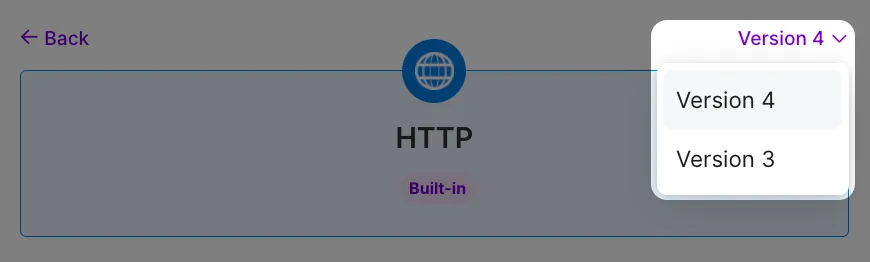
If you're still using the HTTP (legacy) app, choose Version 3 from the drop-down.
HTTP modules
You can use the following modules to build your scenarios:
- Download a fileDownload a file
- Resolve URLResolve URL
Both modules support authenticated and unauthenticated requests.
When authentication is required, choose one of the following methods as required by the target service's API documentation:
- API key
For security reasons, define the authentication details in the dedicated Credentials field rather than passing them through headers or query parameters. This approach provides the following benefits:
- Prevents exposure of keys in your requests
- Centralizes control over authentication credentials
- Allows easy and safe key rotation
Make a request
Makes an HTTP request to any server.
Standard module settings
Read below how to configure the standard module settings.
Field | Description |
|---|---|
Authentication type | Select the authentication type:
|
Credentials | Add the required credentials based on the selected authentication type: |
URL | Enter the URL of an API endpoint (including the base URL), webhook, or webpage, beginning with https://. For example:
Make allows only secure HTTPS. Connections that are using unverified (self-signed) certificates are rejected. |
Method | Select the HTTP method you want to use:
|
Headers | Add headers to provide additional metadata or instructions for the request. For example, User-Agent to identify the client, Cache-Control for caching instructions, etc. You don't need to use this field to define the authentication credentials and content type, as there are specific module fields for that (i.e., Credentials and Content type). |
Query parameters | Enter the query key-value pairs to specify or customize your request. This is mostly relevant for GET and DELETE methods. For example, you can specify which contacts or files you want to retrieve or delete. You can find the query parameters in the service's API documentation. |
Body content type | HTTP body contains the data transferred in an HTTP request. Select the body content type:
|
Body input method (for JSON Body content type) | Select the input method:
|
Body content (for other Body content types) |
|
Content type value (for Custom Body content type) | Specify the content type value, e.g., XML, HTML. |
Parse response | Select Yes to structure the output data so that it’s easy to map. All mappable items will be available after you run the module once. |
Paginationlets you retrieve large data sets in smaller, more manageable parts. Refer to the service's API documentation to see if they allow pagination and which type, and what's needed to configure it. This information is usually provided in the description of a particular endpoint. | |
Pagination type | If you need to make a paginated HTTP request, select the type of pagination; otherwise, leave the field empty. Available pagination types in Make:
|
Pagination response configuration | |
Items path | Enter the path to the array of items. For example, results or result.users. |
Next page URL/link path (for URL or link-based pagination) | Enter the path to the full URL for the next page. For example, links.next or meta.next_page_url. |
Next page token/cursor path (for Token or cursor-based pagination) | Enter the path to the token or cursor value for the next page. For example, next_cursor or meta.next. |
Pagination request configuration | |
Offset parameter name (for Offset-based pagination) | Enter the query parameter name that defines the number of items to skip. For example, offset or skip. |
Initial offset value (for Offset-based pagination) | Enter the number to start the request at. This is typically 0 or 1. You can also use this field to return items beyond Make’s 3200 limit. |
Page parameter name (for Page-based pagination) | Enter the query parameter name that defines the page number. For example, page or page_number. |
Initial page value (for Page-based pagination | Enter the page number to start the request at. This is typically 0 or 1. You can also use this field to return items beyond Make’s 3200 limit. |
Page token/cursor parameter name (for Token or cursor-based pagination) | Enter the query parameter name that defines the last item in the current page or the next page’s starting point. For example, pageToken or cursor. |
Initial page token value (for Token or cursor-based pagination) | This is typically used when working with items beyond Make’s 3200 limit. |
Page size parameter name | Enter the query parameter name that defines the page size. For example, limit or per_page. |
Page size parameter value | Enter the maximum number of items to retrieve per page. |
Output format | Select the output format:
|
Limit | Enter the maximum number of items to return. Must be a number between 1 and 10000. |
Advanced settings
Read below how to configure advanced settings.
Field | Description |
|---|---|
Transport layer security (TLS) | Select the TLS handshake method if required by the API's security settings:
|
CA certificate | Click Create a keychain and add a CA certificate. |
Client identity (for Mutual TLS) | Choose a key or click Add to add a Certificate and a Private Key. |
Proxy | Click Create a keychain if your network requires routing requests through an intermediary server. In the pop-up window, configure the following fields:
|
Return error if HTTP request fails | Select Yes if you want the scenario to stop if the request returns a 4xx or 5xx error. |
Timeout | Enter the maximum time to wait for the response, in seconds. Must be a number between 1 and 300. |
Allow redirects | Select Yes to automatically follow HTTP redirection responses, with a maximum of 10. Expand this section to see how the redirection works. |
Share cookies with other HTTP modules | Select Yes to enable the sharing of cookies with other HTTP modules. |
Request compressed content | Select Yes to request compression of the response data. Adds the Accept-Encoding header. |
Download a file
Downloads a file from a specified URL.
Standard module settings
Read below how to configure the standard module settings.
Field | Description |
|---|---|
Authentication type | Select the authentication type:
|
Credentials | Add the required credentials based on the selected authentication type: |
URL | Enter the URL of the file you want to download. You can use the file (map the file data) in other modules in the scenario. Make only allows secure HTTPS. Connections that are using unverified (self-signed) certificates are rejected. |
Advanced settings
Read below how to configure advanced settings.
Field | Description |
|---|---|
Return error if HTTP request fails | Select Yes if you want the scenario to stop if the request returns a 4xx or 5xx error. |
Share cookies with other HTTP modules | Select Yes to enable the sharing of cookies with other HTTP modules. |
Headers | Add headers to provide additional metadata or instructions for the request. For example, User-Agent to identify the client, Cache-Control for caching instructions, etc. |
Query parameters | Enter the query key-value pairs to specify or customize your request. For example, you can specify the file name, file ID, or format. You can find the query parameters in the service's API documentation. |
Resolve URL
Follows all redirects and returns the final resolved URL.
Standard module settings
Field | Description |
|---|---|
URL | Enter the URL of an API endpoint (including the base URL), webhook, or webpage, beginning with https://. |
Advanced module settings
Field | Description |
|---|---|
Method | Select the HTTP method you want to use:
|