HR management
TalentHR
20 min
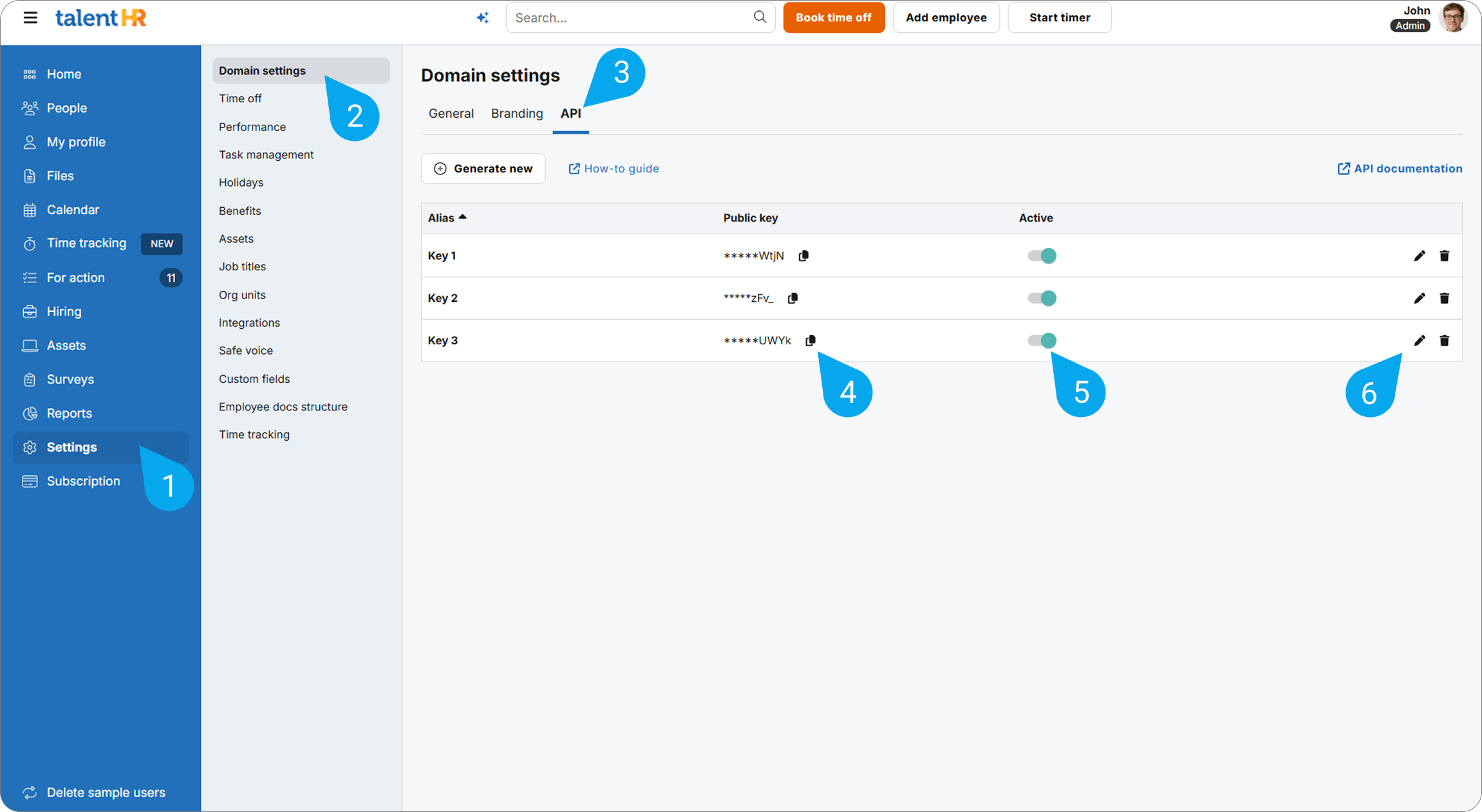
talenthr is a cloud based hr software for small and medium businesses, offering features like employee records, onboarding, time off management, and document storage integrating with make com allows automated employee data syncing, onboarding workflows, and leave management across hr and business tools this is ai generated content based on official talenthr documentation the content may contain mistakes please verify important information if you have questions on vendor documentation, contact https //www talenthr io/contact/ directly requirements to use the talenthr app in make, you must have an active talenthr account and an api key, https //www talenthr io for subscription, refer to the https //www talenthr io connect talenthr and {{product name}} to get started, you must first create a connection between talenthr and {{product name}} , allowing the two services to communicate obtain your api key in your talenthr account create the connection in make obtain your api key in your talenthr account before you create the connection in {{product name}} , you should first obtain your api key in your talenthr account to obtain your api key navigate to settings select domain settings click the api tab click the generate new button copy the api key displayed on screen you will use this value while creating a connection in {{product name}} because the ui might have changed, the steps you see on your screen might be different, https //help talenthr io/hc/en us/articles/17627841146909 can i integrate my site app or custom code with talenthr do you offer an api create the connection in {{product name}} https //www make com/en/register , add the talenthr module to your {{scenario singular lowercase}} , and click create a connection if you add a module with an instant tag, click create a webhook , then create a connection optional in the connection name field, enter a name for the connection enter the authentication credentials you copied from your talenthr account or follow the on screen instructions to create the connection for detailed information on connecting an application, see docid\ so88fm6pkt0g adkddfzz page talenthr modules after connecting to the talenthr app, you can choose from a list of available modules to build your {{scenario plural lowercase}} create (hire) an employee creates a new employee record in the system by hiring a new staff member create a department adds a new department record to your system create a division creates a new organizational division within the system create a job title adds a new job title entry to the system database create a location adds a new location record to the system employee absence summary retrieves a list of employees who are marked as absent during a specified time period get summary of who's out today and tomorrow displays a list of employees who are scheduled to be out of the office today and tomorrow make an api call executes a custom api request to the connected service using your authorized credentials respond to a time off request sends a response to an employee regarding their submitted time off request search employee searches for an employee in your connected system based on specified criteria update a department updates the details of a selected department within your system update a division updates the details of a selected 'division' record in your system update a job title updates the details of a selected 'job title' record within the system update a location updates the details of a selected 'location' record within the system update an employee modifies the details of a specified employee already stored in the system upload an employee's document uploads a specified file to an individual employee’s private folder within the system, supporting formats such as word documents, spreadsheets, presentations, pdfs, and common image types watch deleted employee triggers when an employee record is removed from the system watch job published in ats triggers when a new job position is published in your applicant tracking system (ats) watch new ats application triggers when a candidate submits a new job application through your recruitment platform watch new employee triggers when a new employee record is added to the system watch time off request triggers when an employee submits a new time off request in the system watch time off request approved triggers when an employee's time off request receives approval in the system watch time off request rejected triggers when an employee's time off request is denied in the system watch unpublished job from ats triggers when a job position is removed or unpublished from the ats (applicant tracking system) watch updated employee triggers when any details of an existing employee are modified in talenthr templates you can look for more templates in https //www make com/en/templates , where you'll find thousands of pre created {{scenario plural lowercase}} talenthr resources you can have access to more resources related to this app on the following links https //community make com/search?q=talenthr https //www talenthr io https //apidocs talenthr io/ https //www make com/en/integrations/talenthr