Supabase

Supabase is a Backend-as-a-Service (BaaS) platform that enables developers to build scalable applications by providing a suite of integrated tools. With the Supabase app in Make, you can manage the file storage, receive real-time updates, and store and query data in your Supabase account.
Requirements
To use the Supabase app in Make, you must have a Supabase account. Additionally, you must set up an organization and a project in your Supabase account.
Connect Supabase and Make
To get started, you must first create a connection between Supabase and Make, allowing the two services to communicate.
To create the connection, you need to:
Obtain your Project ID
To obtain the project ID:
Log in to your Supabase account.
Click Dashboard and navigate to your organization.
Click the project you want manage.
In the left sidebar, click Project Settings.
Copy the Project ID and store it in a safe place.
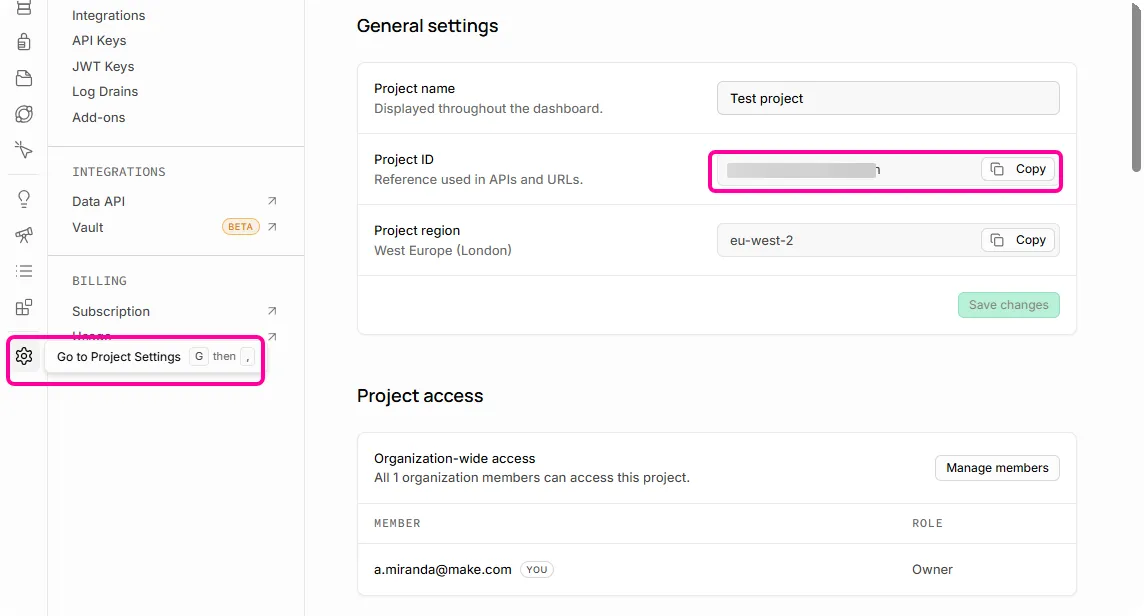
You'll use this value in the Project ID connection field in Make.
Obtain the API Key
To obtain the API key:
Log in to your Supabase account.
Select the specific app for which you need the API key.
In the left sidebar, click Project Settings > API Keys.
Scroll down to Secret keys.
Copy the API Key and store it in a safe place.
You'll use this value in the API Key connection field in Make.
Create the connection in Make
Once you have your Supabase access token, you're ready to create the connection in Make.
To create the connection:
Log in to your Make account, add a Supabase module to your scenario, and click Create a webhook, then click Create a connection.
Optional: In the Connection name field, enter a name for the connection.
In the Project ID field, enter the project ID you copied from your Supabase account.
In the API Key field, enter your API key you copied from your Supabase account.
Click Save.
If prompted, authenticate your account and confirm access.
You've successfully created the connection and can now use the Supabase app in your scenarios. If you want to make changes to your connection in the future, follow the steps here.
Set up a Supabase webhook
The Supabase app has instant modules—webhooks that watch for certain changes in Supabase and immediately start your scenario when those changes happen. To use these modules, you must set up the webhook in your Supabase account.
To set up the webhook:
Add a Supabase instant module to your scenario and click Create a webhook.
Optional: Enter a name for the webhook in the Webhook name field.
In the Connection field, select a connection for the webhook.
If you haven't created a Supabase connection yet, refer to the Connect Supabase and Make section above.
Click Save > Copy address to clipboard. You'll paste this address in the HTTP Request section in your Supabase account.
Log in to your Supabase account.
Click on your project to open it.
In the left sidebar, click Integrations.
In the Search integrations search bar, type Database Webooks.
Click the Webhooks tab.

Click Create a new hook.
In the Name field, enter a name for the webhook.
From the Table dropdown, select the table.
Select one or multiple events to be watched by the webhook.
In the HTTP Request section, paste the URL.
Click Create Webhook.
Your webhook is now set up. When the selected change occurs in Supabase, Make will immediately be notified and start your scenario.
Supabase modules
After connecting to the Supabase app, you can use the following types of modules to build your scenarios.
Templates
You can look for Supabase templates in Make's template gallery, where you'll find thousands of pre-created scenarios.