SOAP
| With the SOAP app in Make, you can use WSDL files to test SOAP-based services. |
|---|
Connect SOAP and Make
To create the connection:
Log in to your Make account, add a SOAP module to your scenario, and click Create a connection.
Optional: In the Connection name field, enter a name for the connection.
Enter your WSDL URI.
Click Save.
You've successfully created the connection and can now use the SOAP app in your scenarios. If you want to make changes to your connection in the future, follow the steps here.
SOAP modules
Actions
- Execute SOAP action
Unsupported features
The SOAP module is currently in beta and does NOT support:
- Redefine elements
- Fraction digits restrictions
- Total digits restrictions
- White space restrictions
- Multiple parts in input and output messages. Only single-part messages are supported.
Custom XML Schema elements are defined with the help of SOAP Encoding (http://schemas.xmlsoap.org) schemas and elements. For example, the following would not be recognized correctly by Make:
<complexType name="ArrayOfFloat">
  <complexContent>
    <restriction base="soapenc:Array">
      <attribute ref="soapenc:arrayType" wsdl:arrayType="xsd:integer[]"/>
    </restriction>
  </complexContent>
</complexType>
It includes the soapenc:Array, soapenc:arrayType and wsdl:arrayType references, which are not yet supported in Make .
If the SOAP module refuses to process the WSDL file or throws various errors in the module's configuration, you may try using the universal HTTP > Make a request module instead:
In Make, create a new scenario.
Add the HTTP > Make a request module.
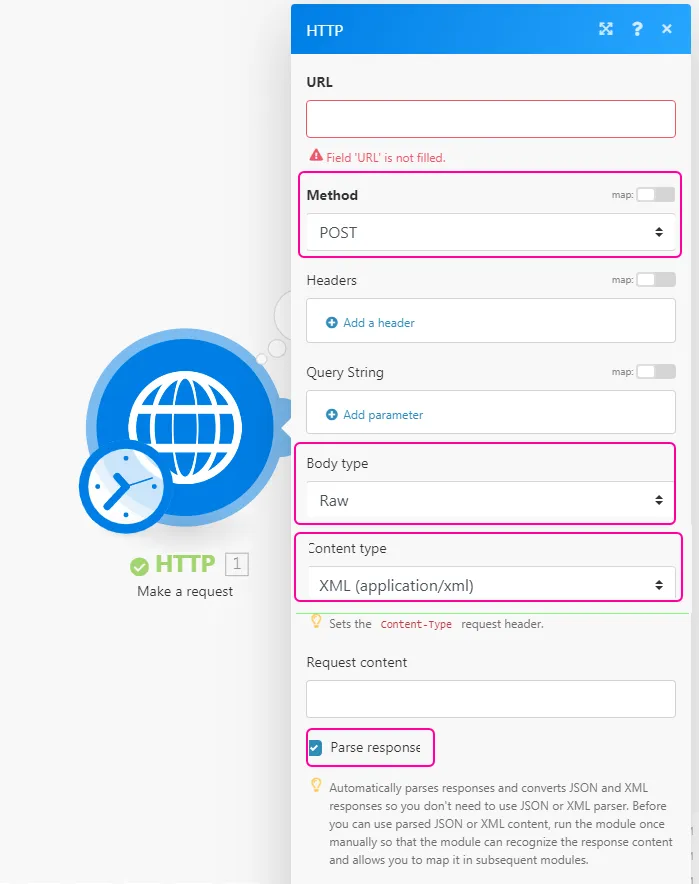
Open the module's configuration and configure it:
Open a new web browser window/tab.
Paste the WSDL URL into the web browser's address bar and fetch the XML file. The WSDL URL usually ends with ?wsdl, but not necessarily, e.g. http://voip.ms/api/v1/server.wsdl
If the WSDL file does not display directly in the web browser, open the downloaded file in a text editor.
Search for the <service> or <wsdl:service>tag.

Once located, copy the URL from the location attribute.
In Make, paste the URL into the HTTP module's URL field.
Open the Online SOAP Client in a new web browser window/tab.
Paste the WSDL URL into the WSDL URL field.
Click on the Browse button.
Pick from the list of functions to the left, e.g. getLanguages.
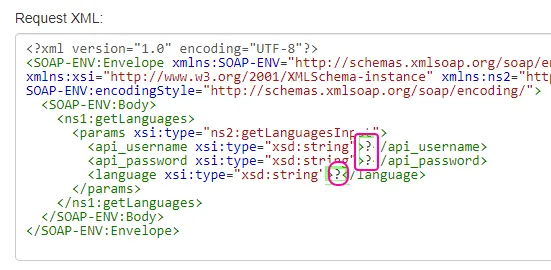
Copy the content of the Request XML text area.
In Make, paste the copied content to the module's Request content field.
Provide values for selected parameters by replacing the question marks with real values:
Close the module's configuration by clicking on the OK button.
Run the scenario or module.