Internet of Things
Rhombus
17 min
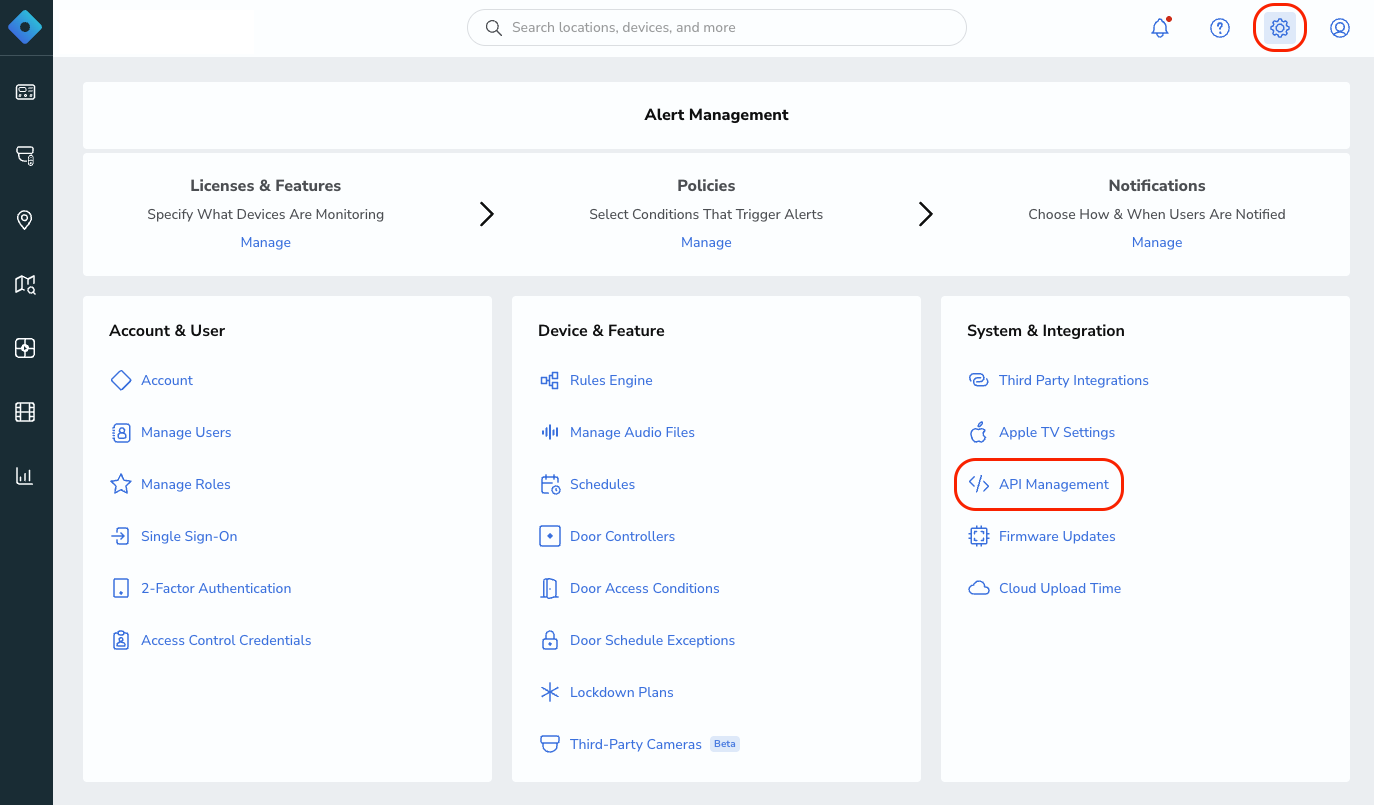
rhombus provides cloud managed security cameras and sensors for real time video surveillance and facility monitoring integrating rhombus with make com lets users automate alerts, manage camera footage, and trigger workflows based on security events or sensor activity this is ai generated content based on official rhombus documentation the content may contain mistakes please verify important information if you have questions on vendor documentation, contact https //www rhombus com/ directly requirements to use the rhombus app in make, you must have an active rhombus account and an api key, https //www rhombus com/ for subscription, refer to the https //www rhombus com/ connect rhombus and {{product name}} to get started, you must first create a connection between rhombus and {{product name}} , allowing the two services to communicate obtain your api key in your rhombus account create the connection in make obtain your api key in your rhombus account before you create the connection in {{product name}} , you should first obtain your api key in your rhombus account to obtain your api key navigate to settings in the rhombus console click api management click to generate a new api key if needed copy the api key displayed on screen you will use this value while creating a connection in {{product name}} because the ui might have changed, the steps you see on your screen might be different, https //support rhombussystems com/hc/en us/articles/28563073768973 using the rhombus make app create the connection in {{product name}} https //www make com/en/register , add the rhombus module to your {{scenario singular lowercase}} , and click create a connection if you add a module with an instant tag, click create a webhook , then create a connection optional in the connection name field, enter a name for the connection enter the authentication credentials you copied from your rhombus account or follow the on screen instructions to create the connection for detailed information on connecting an application, see docid\ so88fm6pkt0g adkddfzz page rhombus modules after connecting to the rhombus app, you can choose from a list of available modules to build your {{scenario plural lowercase}} add users to an access control group adds specified users to a designated access control group, granting them the associated permissions assign an access control credential assigns a currently unassigned credential to a specified user account create a custom seekpoint adds a specific seekpoint to the event timeline, allowing you to mark a custom position within the event create a raw http stream establishes a live raw http video stream from a camera create an access control group creates a new access control group to manage user permissions delete a user removes a specified user account from the selected organization fetch sensor seekpoints for cameras retrieves specific motion detection points from a camera's sensor activity get button press events retrieves a detailed list of all recorded button press events from a specified sensor get details for devices fetches detailed hardware information for several cameras at once get a base station retrieves a list of all base stations currently available for connecting to ble (bluetooth low energy) sensors get a camera ai threshold retrieves the ai generated confidence threshold values that have been normalized for a specific camera get the audio upload metadata for org retrieves a list of metadata details for all audio clips that have been uploaded get the minimal camera state list fetches essential status details for every camera within a specified organization get the rules for a button fetches a complete list of rules associated with a specific button sensor make an api call executes a custom api request to the connected service using your authorized credentials play an audio upload plays a selected audio file through the specified audio gateway device reboot a camera restarts the selected camera device unlock an access controlled door unlocks a door that is secured with access control, allowing authorized entry update a camera ai threshold adjusts the ai confidence threshold settings for a specific camera templates you can look for more templates in https //www make com/en/templates , where you'll find thousands of pre created {{scenario plural lowercase}} rhombus resources you can have access to more resources related to this app on the following links https //community make com/search?q=rhombus%20 https //www rhombus com/ https //support rhombussystems com/hc/en us/articles/28563073768973 using the rhombus make app https //www make com/en/integrations/rhombus