Odoo

With Odoo modules in Make, you can manage the inventory types, inventories, batches tracking, and leads in your Odoo account.
To use the Odoo modules, you must have an account. You can create an account at odoo.com.
Refer to the Odoo API documentation for a list of available endpoints.
Connect Odoo to Make
To establish the connection, you must:
Obtain your API key in Odoo
If you use the Odoo version 14 or higher, you must obtain an API key in your Odoo account. To do it:
Log in to your Odoo account.
Go to the My Profile menu.
Go to the Account Security tab.
Click New API Key.
Copy the API key value shown and store it in a safe place.
You will use this value in the API Key/Password field in Make.
Establish the connection with Odoo in Make
To establish the connection in Make:
Log in to your Make account, add a Odoo module to your scenario, and click Create a connection.
Optional: In the Connection name field, enter a name for the connection.
In the Host field, enter your Odoo account's hostname. For example, if your account URL address is https://www.xyz.odoo.com, your hostname is xyz.odoo.com.
In the Login field, enter your Odoo account credentials.
In the API-Key/Password field, enter either the API key you copied in the section above, or the password you use to log in to your Odoo account.
In the Database field, enter the name of a database in your Odoo account that you want to connect to.
Click Save.
You have successfully established the connection. You can now edit your scenario and add more Odoo modules. If your connection requires reauthorization at any point, follow the connection renewal steps herehere.
Odoo modules
After connecting to the Odoo app, you can use the following types of modules to build your scenarios.
The following example shows how you can update a contact's job position and city in Odoo.
Step 1. Identify the model
First, you need to determine the name of the model you want to work with, as well as the name of the fields you want to update. Each object in Odoo has its own model name. For example:
- Contact — res.partner
- Lead — crm.lead
To find the name of the model:
Log in to your Odoo account.
Navigate to Settings > Technical > Models.
In this page, you can find all the objects you have in your CRM with their description.
To find the Contact model, search "contact" and see the first model appeared.

In the Model column, you can see the model name is res.partner.
It's recommended to click on the model to see the details. With these details, you can confirm that it's the model you are looking for. You can also see the list of fields that is belong to the model.
Step 2. Find the record you want to update
Next, you need to find the record you want to update. In Odoo, each record has a unique ID. When you open a record in Odoo, you can see this ID directly in the page URL.
To find the ID of a record:
Open the record you want to update. It will be the contact record in our example.
Check the URL in your browser’s address bar. The number at the end of the URL is the record ID.
Example: If the URL ends with /odoo/contacts/7, the record ID is 7.
Optional: Find the record ID using the Make an API Call module
You can also find the ID of the record you want to update using the Make an API Call module. To find the specific record's ID:
Log in to your Make account and add a Make an API Call module to your scenario.
In the Entity field, enter the model name: res.partner
In the Action field, select Search and Read option.
In the Parameters field, enter the following sample search for email addresses:
[[["email", "=", "[email protected]"]]]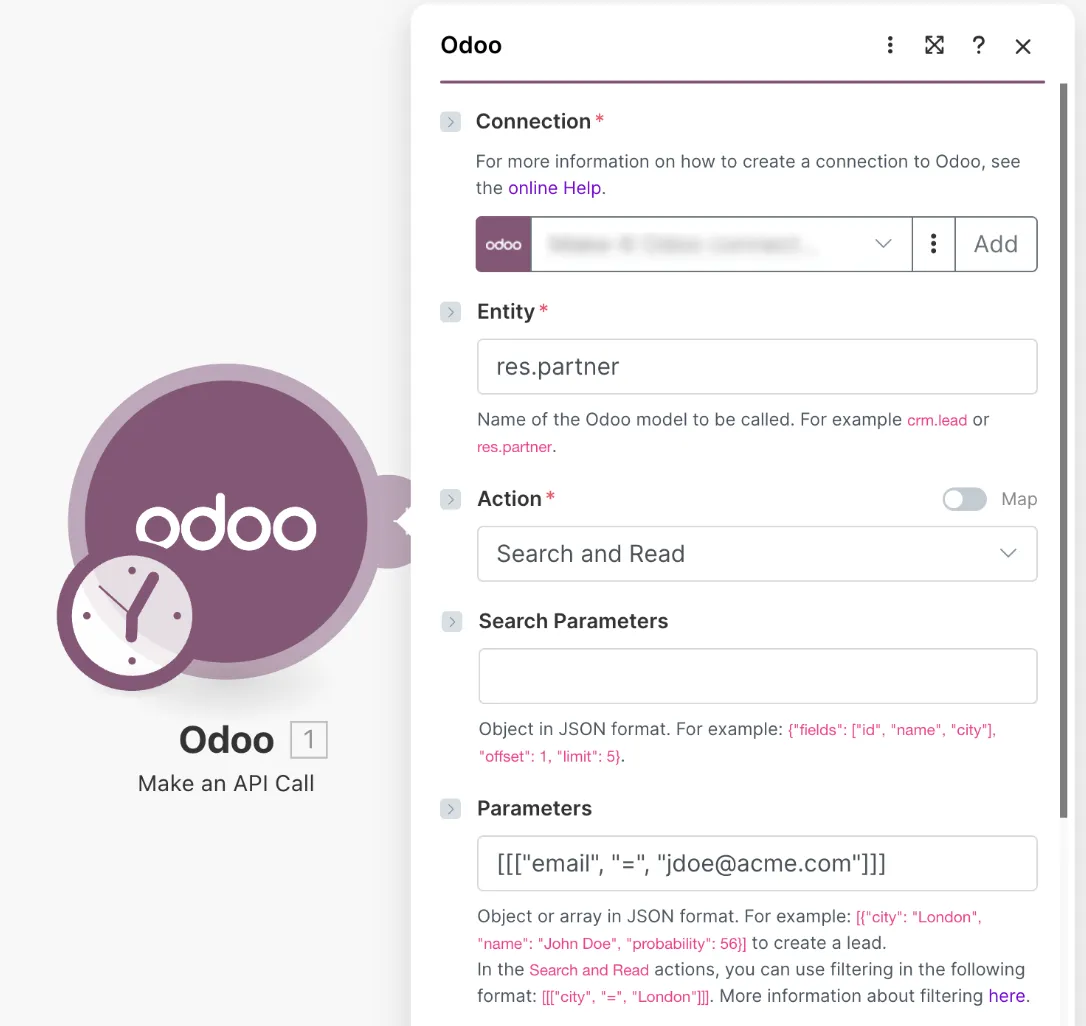
Run the module. You can find the id value under the output bundle.
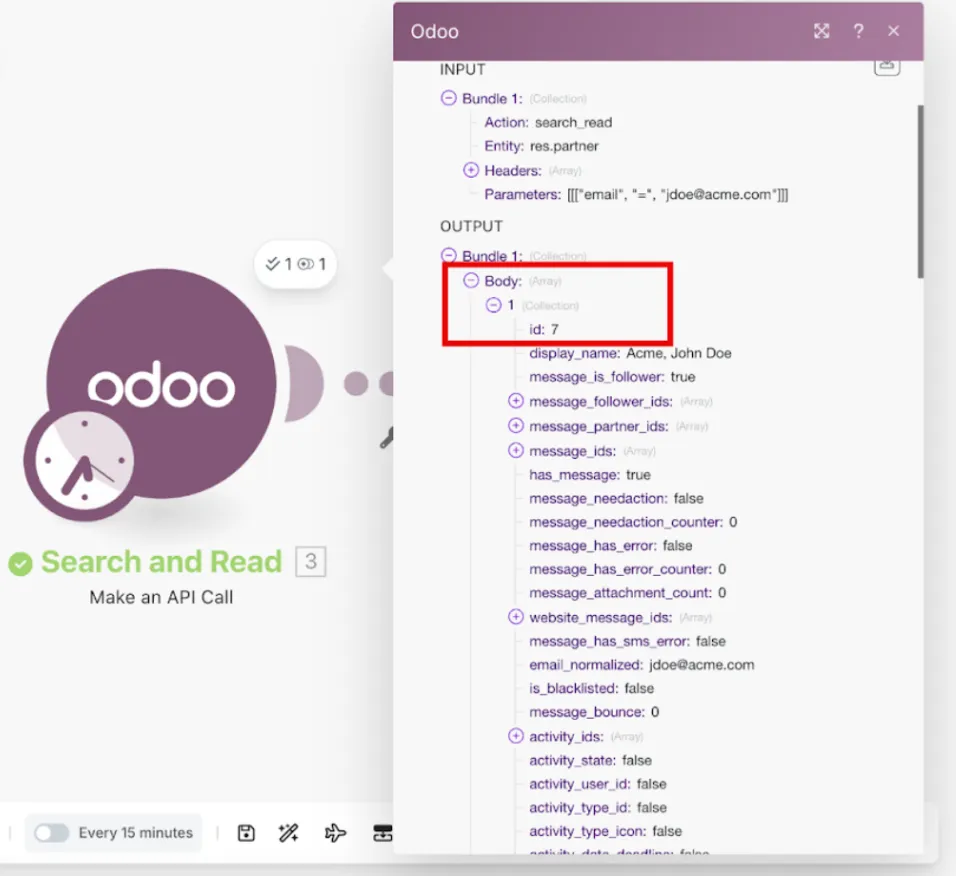
Once you have the ID of the specific record, you can update it using the Make an API Call module.
Step 3. Update the record using the Make an API Call module
Now that you know the model and the ID of the record you want to update, you can update its fields using the Make an API Call module.
To update the record's fields in Odoo:
Add a Make an API Call module to your scenario.
In the Entity field, enter the model name of the record you want to update.
In this example, we use the model res.partner.
res.partnerIn the Action field, select Update Records.
In the Parameters field, define the ID of the record you want to update and the fields you want to change in JSON format.
Example:
[
  [
    7,
    {
      "function": "Customer Service Rep",
      "city": "Paris"
    }
  ]
]
You must use the exact field names defined in the Odoo model.
Field names are case-sensitive and must match what you see in Settings > Technical > Models.
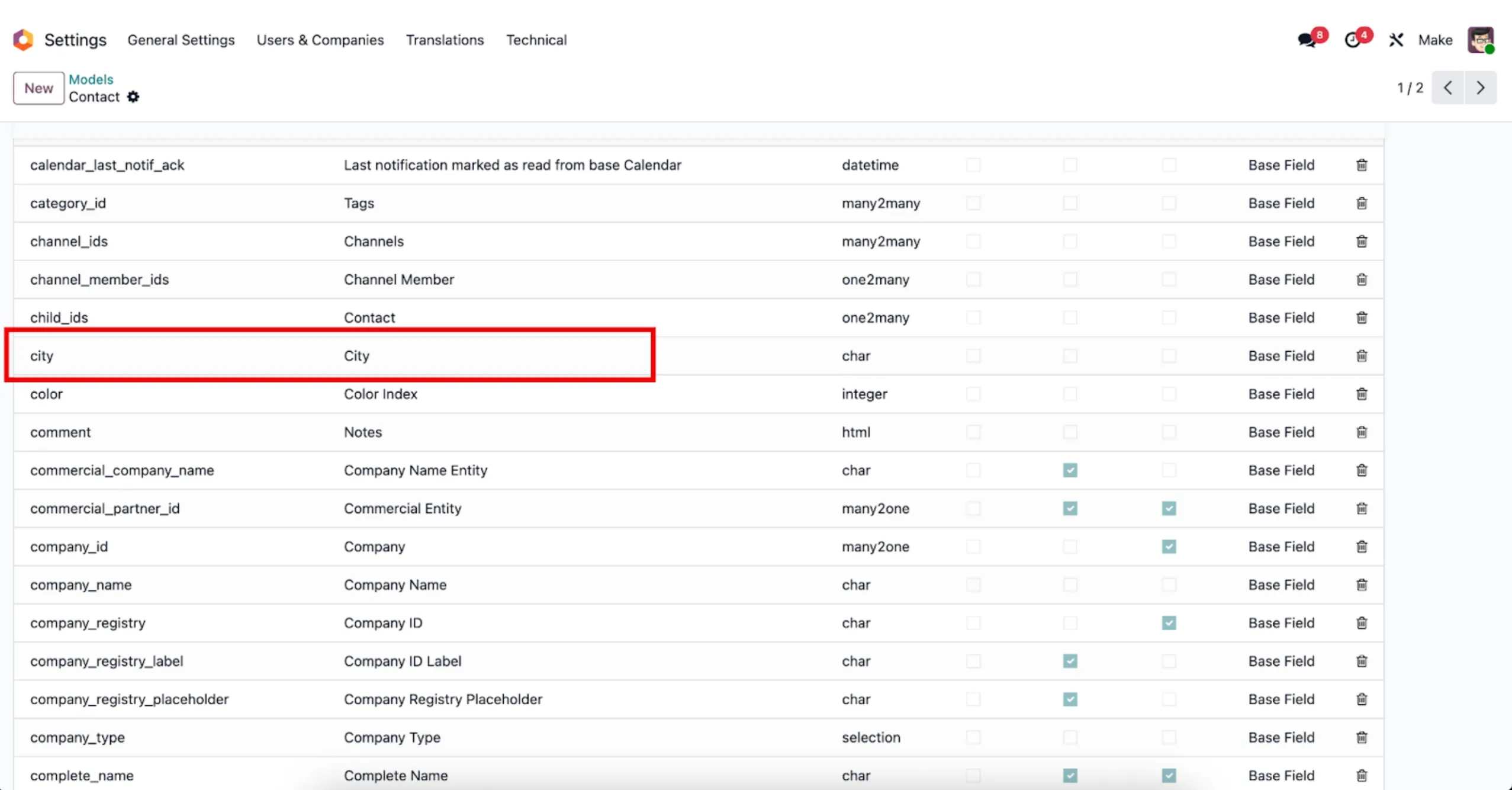
If you retrieved the record ID from a previous Search and Read action, you can map the id value directly from the module output into the Parameters field.
If the search returned only one record, Make will use the first item in the result. If the search returned multiple records, you should iterate through them before updating.
Run the module to update the specified fields for the selected record in Odoo.
Now we’ve updated the selected Odoo record by providing the record ID and field values in the Make an API Call module.