Jotform
 | Jotform is an online form builder that enables users to create forms, collect data, and automate workflows. Integrating Jotform with Make lets users automatically process form submissions, trigger notifications, and sync collected data with other apps. |
|---|
Requirements
To use the Jotform app in Make, you must have an active Jotform account and an API Key. For subscription, refer to the Jotform pricing page.
Connect Jotform and Make
To get started, you must first create a connection between Jotform and Make, allowing the two services to communicate.
Obtain your API Key in your Jotform account
To connect your Jotform account to Make, you must first obtain the API Key from your Jotform account. Refer to the Daily API Call Limits guide for information regarding API Key request limitations.
To obtain your API Key :
Log in to your Jotform account.
Navigate to your profile > Settings after logging in.
In the left sidebar, click API.
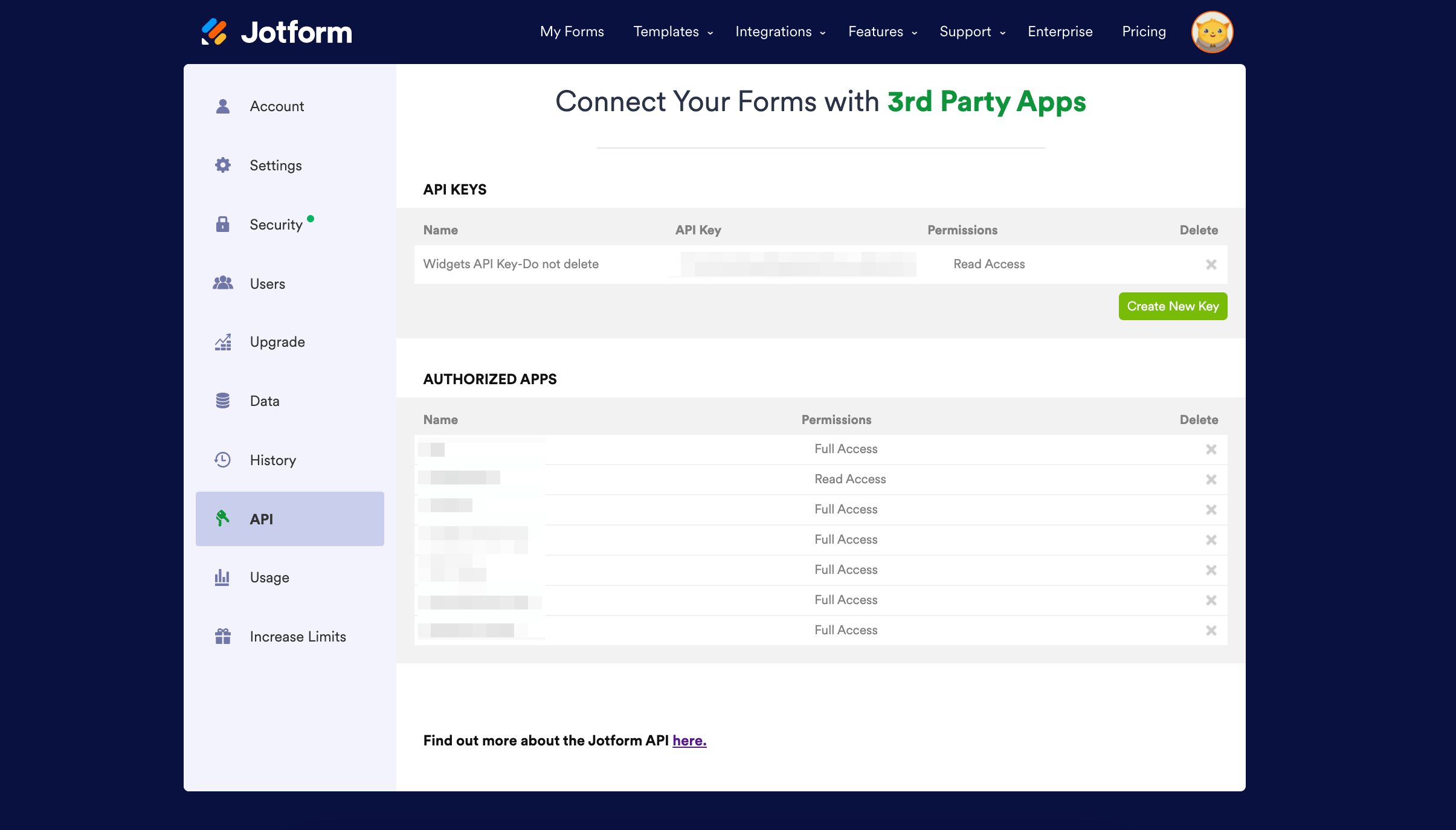
Click Create New Key.
Next to the API Key value, click within the Permissions box and select the API Key's access level.
To use Jotform modules that write data into your Jotform account, for example Create a New Form and Add Questions to Form, select Full Access.
Copy the API key displayed on the screen. You will use this key in the API Key field in Make.
Because the UI might have changed, the steps you see on your screen might be different, check the vendor documentation for updates .
Create the connection in Make
Log in in your Make account, add the Jotform module to your scenario, and click Create a connection.
If you add a module with an instant tag, click Create a webhook, then Create a connection.
Optional: In the Connection name field, enter a name for the connection.
Enter the authentication credentials you copied from your Jotform account or follow the on-screen instructions to create the connection.
Optional: Click Show advanced settings and enter your Enterprise Domain to connect to your enterprise address or select whether your Jotform account is in HIPAA Safe Mode to redirect to the corresponding API domain.
If prompted, authenticate your account and confirm access.
Jotform modules
After connecting to the Jotform app, you can choose from a list of available modules to build your scenarios.
Templates
You can look for more templates in Make's template gallery, where you'll find thousands of pre-created scenarios.
Jotform Troubleshooting
Unable to Create a Webhook
If your connection is working but you are unable to create a webhook, your Jotform API Key may not have the necessary Full Access. To update the access level, go to your Jotform account profile settings, click on the API tab in the left sidebar, and ensure that your API Key has Full Access. If it has Read Access, click within the Permissions box and select Full Access.
Forms Are Not Displayed in Make
If your Jotform form is not visible in Make, first ensure that it has not been disabled in your Jotform account. In your Jotform account, open the form that is not visible in Make, click on More in the top menu, and ensure that the Disable option is not selected. If it is disabled, click on Enable to make your form visible.
If your form was already enabled or the form still is not visible after enabling, you can create a new connection in Make using a new Jotform API Key. Follow the instructions in the Connect Jotform to Make to create a new API Key and establish the connection.
Jotform resources
You can have access to more resources related to this app on the following links