IT and Development
FogBugz
32 min
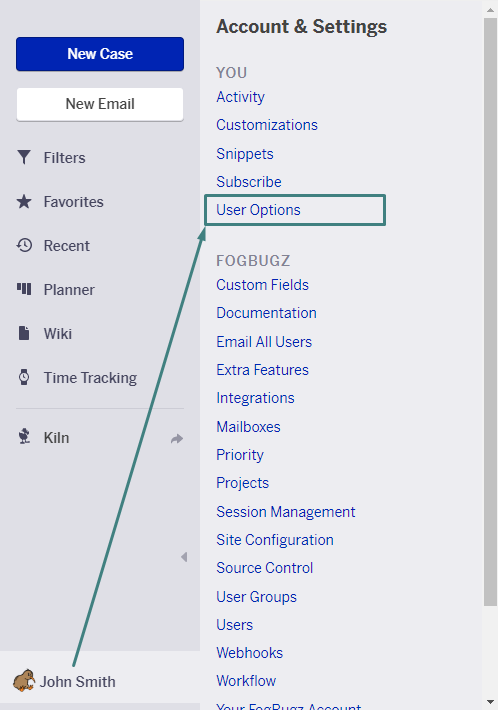
fogbugz is a project management and issue tracking tool for software teams integrating fogbugz with make com enables users to automate bug tracking, manage cases, and synchronize project updates across other collaboration or development platforms this is ai generated content based on official fogbugz documentation the content may contain mistakes please verify important information if you have questions on vendor documentation, contact https //ignitetech com/softwarelibrary/fogbugz directly requirements to use the fogbugz app in make, you must have an active fogbugz account and an api token, https //ignitetech com/softwarelibrary/fogbugz for subscription, refer to the https //ignitetech com/softwarelibrary/fogbugz connect fogbugz and {{product name}} to get started, you must first create a connection between fogbugz and {{product name}} , allowing the two services to communicate obtain your api key in your fogbugz account create the connection in make obtain your api key in your fogbugz account before you create the connection in {{product name}} , you should first obtain your api key in your fogbugz account to obtain your api key navigate to the avatar menu and select user options click create api token copy the api token displayed on screen you will use this value while creating a connection in {{product name}} because the ui might have changed, the steps you see on your screen might be different, https //support fogbugz com/en us/article/52425 create api token using the fogbugz ui create the connection in {{product name}} https //www make com/en/register , add the fogbugz module to your {{scenario singular lowercase}} , and click create a connection if you add a module with an instant tag, click create a webhook , then create a connection optional in the connection name field, enter a name for the connection enter the authentication credentials you copied from your fogbugz account or follow the on screen instructions to create the connection for detailed information on connecting an application, see docid\ so88fm6pkt0g adkddfzz page fogbugz modules after connecting to the fogbugz app, you can choose from a list of available modules to build your {{scenario plural lowercase}} add a milestone dependency establishes a relationship where one milestone depends on the completion of another milestone assign a case updates a selected case and assigns it to a specified individual close a case updates the details of a specified case and then closes it, automatically assigning the case to the user with id 1 create a case creates a new case record in your system create a milestone creates a new project milestone to help track progress and key achievements create a project creates a new project within your selected workspace or account create a user creates a new user account in the connected application create an area creates a new area within your account for organizing and managing related items or activities delete a milestone dependency deletes the link that connects two milestones, removing their dependency edit a case updates the details of a selected case record email a case updates the details of a specific case and sends an email notification about the changes for best results, ensure the case you are emailing from contains all relevant information get a case fetches comprehensive information about a particular case, including its attributes and status get a milestone retrieves detailed information about a specific milestone get a project retrieves and displays detailed information about a specific project get a user allows you to retrieve and display detailed information about a specific user get an area retrieves detailed information about a specific area list areas retrieves a list of available areas from your account list milestones retrieves a complete list of all milestones within your project list projects retrieves a list of all available projects from your account list users retrieves a list of all users registered on the site list/search cases searches for cases or retrieves all cases that match the criteria specified in the current filter make an api call executes a custom api request to the connected service using your authorized credentials reactivate a case updates the details of a specific case and reactivates it if it was previously inactive reopen a case updates the details of a specified case and changes its status to reopened resolve a case updates the details of a specific case and marks it as resolved update a milestone updates the details of a specified milestone update a user enables you to update the details of an existing user account watch areas triggers when a new area is added to your account watch case assigned triggers when a case is assigned to a user or team watch case closed triggers when a support case is marked as closed in your system watch case edited triggers when any changes are made to an existing case watch case email event triggers when an email related to a specific case is received or sent watch case email forwarded triggers when an email related to a case is forwarded to another recipient watch case email received triggers when an email related to a specific case is received in your system watch case email replied triggers when a response is received to a case related email watch case email sent triggers when an email related to a specific case is successfully sent watch case email sorted triggers when an email related to a case is categorized or assigned to a specific folder watch case event triggers when a specific event related to a case takes place watch case opened triggers when a new support case is created in your system watch case reactivated triggers when an existing case is reopened or reactivated in the system watch case reopened triggers when an existing case is reopened after being previously closed watch case resolved triggers when a support case is marked as resolved in the system watch case status changed triggers when the status of an existing case is updated watch categories triggers an event whenever a new category is added to your system watch milestones triggers when a new milestone is added to your project watch projects triggers when a new project is added to your account watch statuses triggers when a new status entry is added to your account watch tags triggers when a new tag is added to your account watch users triggers when a new user account is added to your system templates you can look for more templates in https //www make com/en/templates , where you'll find thousands of pre created {{scenario plural lowercase}} fogbugz resources you can have access to more resources related to this app on the following links https //community make com/search?q=fogbugz https //ignitetech com/softwarelibrary/fogbugz https //support fogbugz com/hc/en us/sections/360002378313 fogbugz api reference https //www make com/en/integrations/fogbugz