Bigin by Zoho CRM
With Bigin by Zoho CRM modules in Make, you can manage the companies, contacts, tasks, events, calls, pipelines, users, and tags in your Bigin by Zoho CRM account.
To use the Bigin by Zoho CRM modules, you must have a Bigin account. You can create an account at bigin.com.
Refer to the Bigin by Zoho CRM API documentation for a list of available endpoints.
Connect Bigin by Zoho CRM to Make
To establish the connection in Make:
Log in to your Make account, add a Bigin by Zoho CRM module to your scenario, and click Create a connection.
Optional: In the Connection name field, enter a name for the connection.
In the Choose your location field, select your region.
For Additional Scopes, add any necessary scopes you may require.
Additional scopes are required for the Make an API Call module. For details, see the Bigin by Zoho CRM documentation. Add scopes for every API call you will make with this connection.
Optional: Switch on the Show advanced settings toggle and enter your custom app client credentials. For more information, refer to the Create a custom application in Bigin by Zoho CRM section.
Click Save.
If prompted, authenticate your account and confirm access.
You have successfully established the connection. You can now edit your scenario and add more Bigin by Zoho CRM modules. If your connection requires reauthorization at any point, follow the connection renewal steps herehere.
Create a custom application in Bigin by Zoho CRM
To create a Bigin by Zoho CRM custom application and retrieve your client credentials:
Log in to the Zoho API Console.
Click + Add Client.
Choose a Client Type.
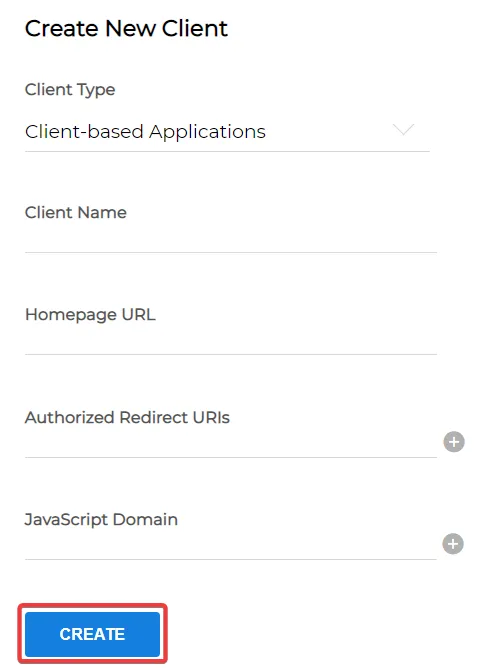
Enter the app details as shown below and click CREATE.
In the Authorized Redirect URIs field, enter the following URL: https://www.make.com/oauth/cb/bigin-by-zoho2
Copy your Client ID and Client Secret values and store them in a safe place.
You'll use these values in the Client ID and Client Secret connection fields in Make.