Amazon Lambda
The Amazon Lambda modules allow you to watch, invoke, list, and retrieve the functions, layers, and layer versions in your Amazon Lambda account.
Get Started with Amazon Lambda
Prerequisites:
Connect Amazon Lambda to Make
To connect your Amazon Lambda account to Make you need to obtain the API Key from your Amazon Lambda account and insert it in the Create a connection dialog in the Make module.
- Log in to your Amazon Lambda account.
Click your Account Name > My Security Credentials > Access keys (access key ID and secret access key) > Create New Access Key .

Click Show Access Key to display the Access Key ID and Secret Access Key. Copy and save the provided keys in a safe place.

Go to Make and open the Amazon Lambda module's Create a connectio n dialog.

- In the Connection name field, enter a name for the connection.
- In the AWS Key and AWS Secret Key fields, enter the Access Key and Secret Access Key values provided in step 3 above.
- In the Region field, select your region and click Continue .
The connection has been established.
Assign Permissions in Your Lambda Account
For Amazon LAmda modules to work, you need to enable permissions in your AWS account.
- Log in to your AWS account.
In the Search Field, enter IAM and in the Features section, select the IAM.

Click Create policy .
 61f266efc3109.png
- In the Service section, choose Lambda.
In the Actions section, click Expand all and select the following minimum permissions required to use the Make Lambda functions:

For more information on the actions for Layer or other categories, see the Lambda Functions .
Function
Watch Functions
Triggers when a function is last updated.
Field | Description |
|---|---|
Connection | Establish a connection to your Amazon Lambda account. |
Limit | Set the maximum number of functions Make should return during one Make execution cycle. |
List Functions
Retrieves a list of all AWS Lambda functions.
Field | Description |
|---|---|
Connection | Establish a connection to your Amazon Lambda account. |
Limit | Set the maximum number of functions Make should return during one Make execution cycle. |
Get a Function
Gets the information of an AWS Lambda function.
Field | Description |
|---|---|
Connection | Establish a connection to your Amazon Lambda account. |
Function Name | Select the function whose details you want to retrieve. |
Invoke a Function
Invoke an AWS Lambda function synchronously or asynchronously.
Field | Description |
|---|---|
Connection | Establish a connection to your Amazon Lambda account. |
Function Name | Select the function name for which you want to invoke a function. |
Invocation Type | Select the invoke type:
|
Body | Enter the function details in JSON format which you want to provide to the Lambda function as input. For example, { "key": "value" }. |
Layer
Watch Layer Versions
Triggers when a new version of an AWS Lambda layer is created.
Field | Description |
|---|---|
Connection | Establish a connection to your Amazon Lambda account. |
Layer Name | Select the layer name or Amazon Resource Name whose version you want to watch. Enter a name between |
Compatible Runtime | Select the compatible runtime identifier for the layer. For example, nodejs. |
Limit | Set the maximum number of layer versions Make should return during one Make execution cycle. The maximum number of layers returned is 50. |
List Layers
Retrieves a list of all AWS Lambda layers.
Field | Description |
|---|---|
Connection | Establish a connection to your Amazon Lambda account. |
Layer Name | Select the layer name or Amazon Resource Name whose version you want to watch. Enter a name between |
Compatible Runtime | Select the compatible runtime identifier for the layer. For example, nodejs. |
Limit | Set the maximum number of layers Make should return during one Make execution cycle. The maximum number of layers returned is 50. |
List Layer Versions
Retrieves a list of the versions of an AWS Lambda layer.
Field | Description |
|---|---|
Connection | Establish a connection to your Amazon Lambda account. |
Layer Name | Select the layer name or Amazon Resource Name whose version you want to watch. |
Compatible Runtime | Select the compatible runtime identifier for the layer. For example, nodejs. |
Limit | Set the maximum number of layers versions Make should return during one Make execution cycle. The maximum number of layers returned is 50. |
Get a Layer Version
Gets the information of a version of an AWS Lambda layer.
Field | Description |
|---|---|
Connection | Establish a connection to your Amazon Lambda account. |
Layer Name | Select the layer name whose details you want to retrieve. |
Version | Select the layer version. |
Other
Make an API Call
Performs an arbitrary authorized API call.
Field | Description |
|---|---|
Connection | Establish a connection to your Amazon Lambda account. |
URL | Enter a path relative to https://lambda.{region}.amazonaws.com. For example: /2015-03-31/functions |
Method | Select the HTTP method you want to use: GET: to retrieve information for an entry. POST: to create a new entry. PUT: to update/replace an existing entry. PATCH: to make a partial entry update. DELETE: to delete an entry. |
Headers | Enter the desired request headers. You don't have to add authorization headers; we already did that for you. |
Query String | Enter the request query string. |
Body | Enter the body content for your API call. |
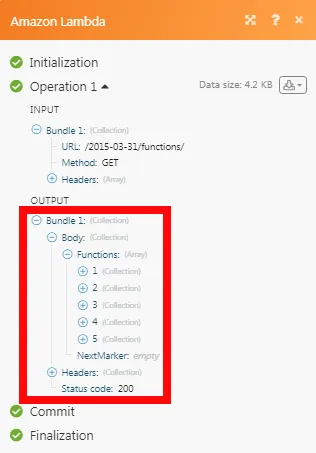
The following API call returns all functions from your Amazon Lambda account:
URL :
/31-03-2015/functions
Method :
GET

Matches of the search can be found in the module's Output under Bundle > Body .
In our example, 5 functions were returned:
For the list of available endpoints, refer to the Amazon Lambda API Documentation .